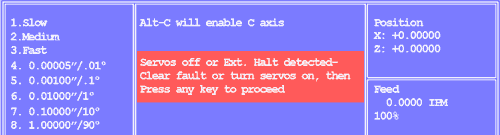
NOTE: At initial turn-on, if you can't turn the servos on, and this screen won't clear, go to Servos Won't Come On.
This error will occur while running parts for the following reasons:
- If any door interlock or other guards have opened
- If the spindle drive has faulted
- If a loader or other automation has faulted
If a door interlock or other guard has opened, you will not be able to jog.
If you can jog, the error is caused by spindle drive fault or loader fault.
If you cannot jog
If you cannot jog, open and close all the guards, then see if you can jog. If you still cannot jog, use Alt-I diagnostic to see if guards input is active (0) or not (1). To open the diagnostic window, press and hold the Alt key, then press the I key.
Alt-I Diagnostic Screen Excerpt
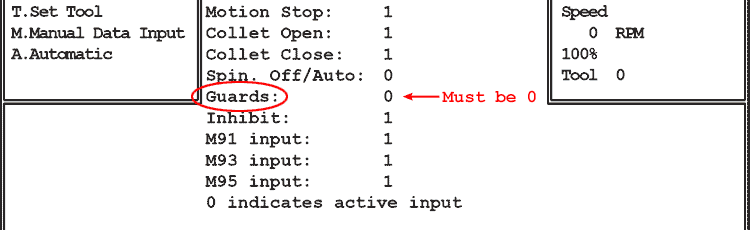
If the Guards input is 1 and you've opened, then closed all the door interlocks and guards, then one of the switches has failed. Use Alt-G to temporarily bypass the guards: press and hold the Alt key, then press the G key, then press Esc. Note that Motion Stop will change to 1, but Guards will remain at 1.
Select a jog speed and attempt to jog: if the slide jogs with Alt-G active, the problem is a bad door switch or open connection in the door interlock string.
Alt-G is cancelled when Auto mode is selected.
If you can jog
If you can jog, you could have a spindle drive fault, or, if there is a loader or other automation connected, it may be in fault mode.
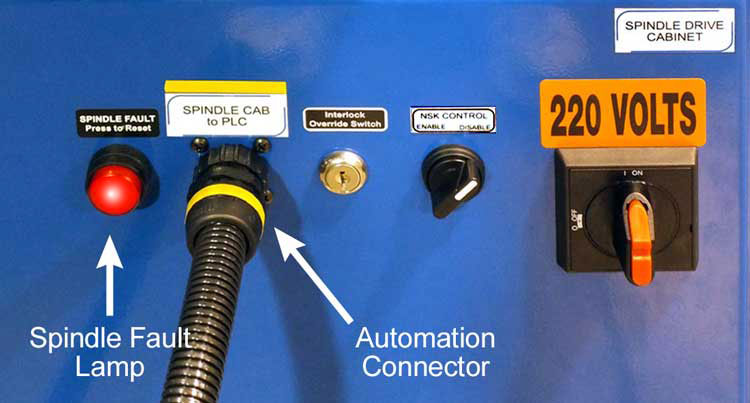
If it's a spindle drive fault or a loader or other automation fault, the Spindle Fault lamp on the spindle drive cabinet should be lit.
If a loader or other automation is connected, there will be a cable connected to the spindle drive cabinet door.
Photo below shows Spindle Fault lamp and Automation Connector.
Spindle Fault Lamp & Automation Connector
If automation is connected, examine it for any obvious fault. If no fault is apparent, power down, disconnect the automation cable, power up and see if the screen clears when you turn on servos.
If no automation is connected, press and release the Spindle Fault Lamp. This will reset certain spindle drive faults.
If the light goes out you may have a decelleration fault. The braking resistor may have failed.
If the light stays on, you must look at the spindle drive display to determine the cause of fault.
To do this you must power down completely and set the 220VAC discnnect to OFF. Open the spindle cabinet door, then, use a pliers to set the disconnect to ON, power up the controller and turn servos on. If the Ext. Halt screen doesn't clear, look at the spindle drive display and note the error code.