Ctrl-S Diagnostic Screen
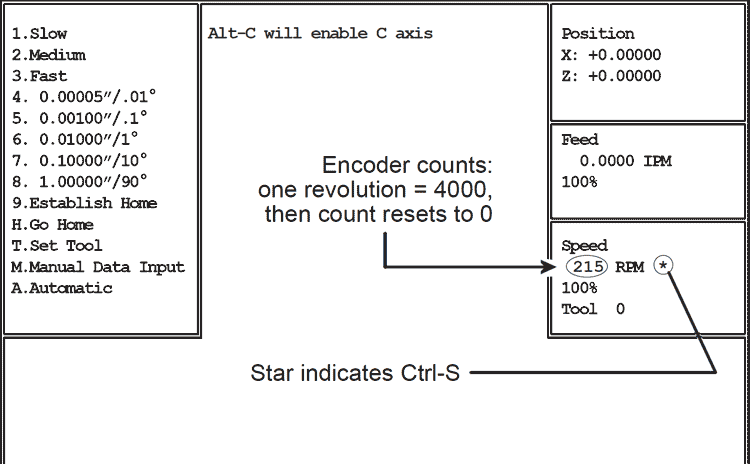
Pressing Ctrl-S in Jog Mode enables display of spindle encoder counts and marker.
If the slide doesn’t move, or moves erratically in any “inches per revolution” mode (g95, g33, g83 etc) Ctrl-S is a quick way to determine if the spindle encoder is at fault.
Ctrl-S Diagnostic Screen
When Ctrl-S is active, a star (*) appears to the right of RPM in the spindle speed box. The numbers to the left of RPM are encoder counts. Turning the spindle by hand will increase or decrease the numbers until the marker is encountered. There are 4000 encoder counts and one marker. When the marker is encountered, the numbers will increase to 3999, then reset to zero.
To verify that the spindle encoder is functional, go to Jog Mode, press Ctrl-S, then slowly turn the spindle while watching the encoder count.
Initially, turn the spindle first one way, then the other less than 1/8 turn: unless you are right at the marker, the numbers should count up in one direction and count down in the other. If the numbers don’t change, or if they only change in one direction, the encoder is faulty.
If the numbers increase and decrease, turn the spindle to increase the numbers. If the marker is working properly, the numbers should count to 4000, then start over at zero. If the numbers don’t reset, the encoder is faulty. To alert you to this, the color of the numbers will reverse at about 4100 counts.
To cancel Ctrl-S press Ctrl-S again.